There’s no shortage of AI case studies that describe what was built without explaining how. This isn’t one of those. In this post, we’re walking through the actual architecture of an agentic AI system we built using Claude API and Model Context Protocol — what the client needed, what we built, and what we learned.
We’ve anonymised the client details to protect confidentiality, but the technical decisions, challenges, and outcomes are real.
The Challenge
The client is a Singapore-based financial services firm with operations across Southeast Asia. Their operations team was drowning in a manual process: reviewing incoming client documentation, cross-referencing it against multiple internal systems, identifying discrepancies, and generating structured reports for compliance review.
The process involved three separate enterprise systems — a CRM, a document management platform, and a compliance database — and required analysts to log into each system, extract relevant data, compare it manually, and produce a Word report. Each case took an experienced analyst 90 to 120 minutes. The team was handling 40 to 60 cases per week.
The business wanted to cut that time by at least 70% without reducing accuracy. The compliance team wanted full auditability. The IT team wanted a solution that integrated with existing systems rather than creating a new data silo.
Why Claude
Several requirements pointed directly to Claude. The document review component involved complex, lengthy financial and legal documents — often 50 to 100 pages each. Claude’s extended context window meant we could process entire documents in a single pass rather than chunking them, which preserves document coherence and reduces errors.
The compliance reporting requirement demanded high instruction-following fidelity. The output had to conform to a specific structured format — not approximately, but exactly. In our evaluation, Claude significantly outperformed alternative models on structured output compliance across a range of document types.
And the multi-system integration requirement made MCP the natural integration architecture.
The Architecture
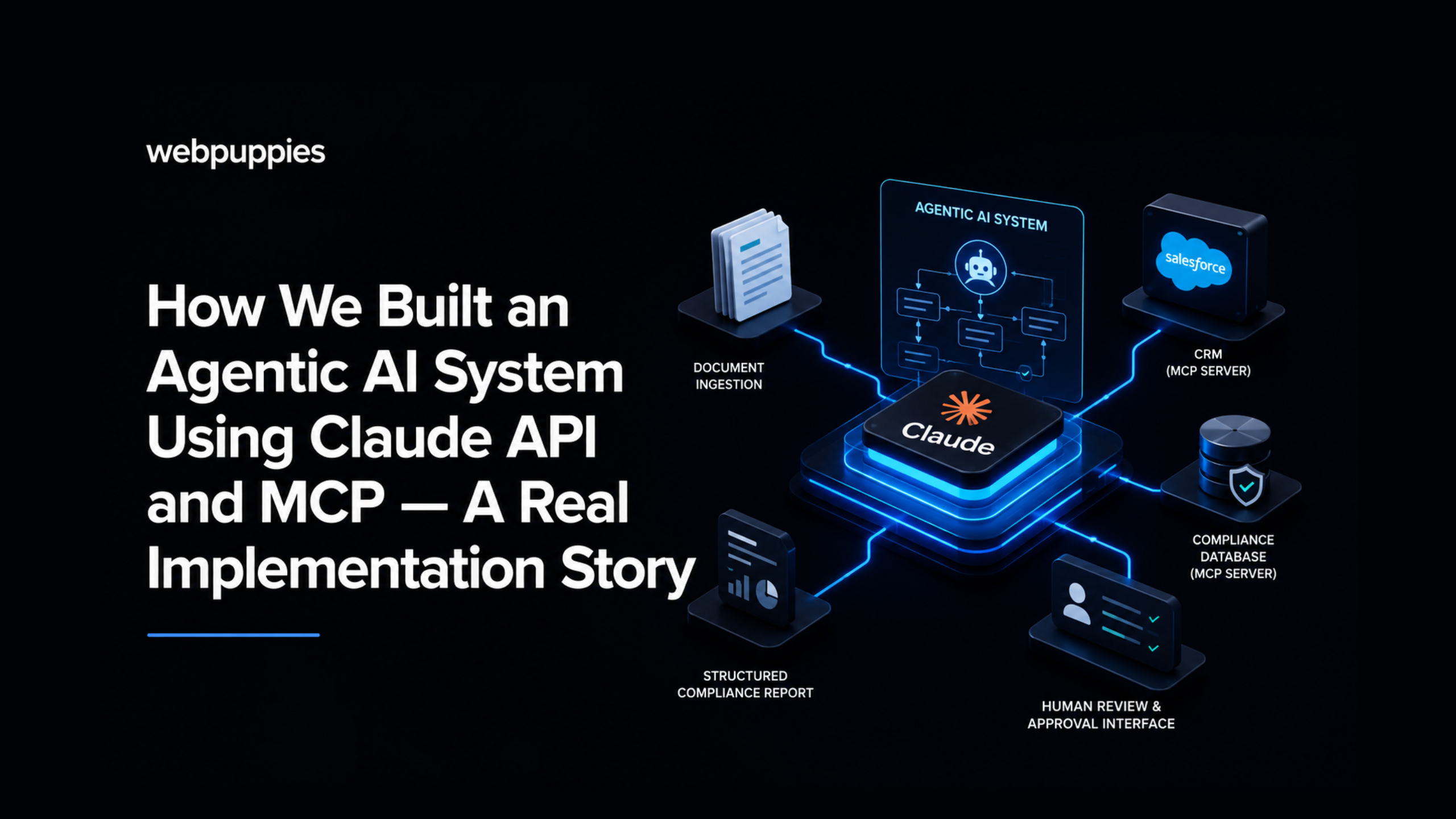
The system we built has five components:
1. Document ingestion layer
Incoming client documents — PDFs, Word files, and scanned images — are processed through a document normalisation layer. Scanned documents go through OCR. All documents are converted to structured text and staged for processing. This layer sits outside Claude and feeds clean text into the agent context.
2. MCP server — CRM connector
We built an MCP server that exposes a defined set of operations against the client’s Salesforce CRM: retrieve client record by ID, list recent interactions, fetch linked accounts, and update case status. The server operates under least-privilege principles — the AI can read client data and update the case status field, but cannot modify any other fields or access data outside the defined scope.
3. MCP server — compliance database connector
A second MCP server connects Claude to the compliance database. It exposes search and retrieval operations: query regulatory requirements by jurisdiction, retrieve previous compliance findings for a client ID, and fetch current sanctions list status. This server is read-only. The compliance database is never written to by the AI.
4. Claude agent orchestration layer
The agent layer is where Claude does its work. Given a case ID and the associated documents, the agent follows a defined workflow:
- Retrieve client record from CRM via MCP
- Extract key data points from the submitted documentation
- Cross-reference document data against CRM record for discrepancies
- Query compliance database for relevant regulatory requirements and prior findings
- Generate a structured compliance report in the required template format
- Flag any discrepancies or compliance concerns for human review
- Update CRM case status via MCP to indicate AI review complete
Each step is logged. The agent’s reasoning at each decision point is captured in the audit trail. Human analysts can review not just what the AI concluded, but why.
5. Human review and approval interface
The AI never closes a compliance case autonomously. Every case the agent processes enters a human review queue. The analyst sees the AI-generated report, the flagged discrepancies, and the agent’s reasoning. They can approve, modify, or reject the AI’s assessment. The final compliance decision is always human.
This was a deliberate design choice, not a limitation. For regulated financial services, human accountability in compliance decisions is a regulatory requirement, not optional. The AI accelerates the process and improves consistency — it doesn’t replace human judgment.
What We Learned
MCP permissions require more thought than you expect
Defining the MCP permission model took significantly longer than building the servers themselves. The questions — what can the AI read, what can it write, what should it never touch, what happens if it tries to access out-of-scope data — require input from IT, compliance, and business stakeholders. Plan for this. It’s time well spent.
Structured output prompting is an art
Claude is excellent at structured output, but getting that output to exactly match a complex report template required iterative prompt engineering. The breakthrough was providing the template as part of the system prompt rather than the user prompt, and including explicit output validation criteria that Claude could check its own work against.
Context management is critical at scale
For long documents, we developed a two-pass approach: a first pass that extracts and structures the key data points, and a second pass that uses the structured data (rather than the full document) for the cross-referencing and report generation. This reduced token costs and improved consistency without sacrificing accuracy.
The human review layer is a feature, not a fallback
Initially, the client saw the human review requirement as a limitation — they wanted full automation. After the first month in production, the compliance team changed their view. The AI-generated reports were accurate enough that the review step became a quality check, not an active correction exercise. Analyst time per case dropped from 90–120 minutes to 15–20 minutes. The team is now handling significantly higher case volumes with the same headcount.
The Outcomes
After three months in production:
- Average case processing time reduced by 82% (from 90–120 minutes to 15–20 minutes)
- Case throughput increased from 40–60 per week to over 100 per week
- Compliance team reported fewer missed discrepancies versus manual review
- Full audit trail for every AI-assisted case decision
- Zero compliance incidents attributable to the AI system
What This Means for Your Business
This wasn’t a research project or a proof-of-concept. It’s a production system handling real compliance workloads at a regulated Singapore financial services firm, every day.
The architecture we built — Claude API + MCP integration + human review layer — is repeatable. The core pattern applies across industries: any process that involves document review, multi-system data retrieval, structured reporting, and human decision-making is a candidate.
If you’re a CTO, CDO, or operations leader trying to figure out where AI can deliver real value in your business — not hype, but measurable business outcomes — we’d like to talk.
→ Book a free AI architecture session with our certified Claude team at webpuppies.com.sg